How to Export Your Instagram Data for Unfollow Analysis
Have you ever wondered which accounts you follow on Instagram don't follow you back? While Instagram's app doesn't make this easy to find out, they provide a way to download your data. With this data, you can use Unfollow.site to instantly discover who's not following you back.
This guide will walk you through the exact steps to request and download your Instagram data, then show you how to analyze it on Unfollow.site to identify users who don't follow you back - completely free and private!
Step 1: Request Your Data from Instagram
First, you need to ask Instagram for a copy of your information. The best format for this is JSON, as it's structured and easy for computers to read.
-
Open the Instagram App and go to your profile page.
-
Tap the hamburger menu (three horizontal lines) in the top-right corner.
-
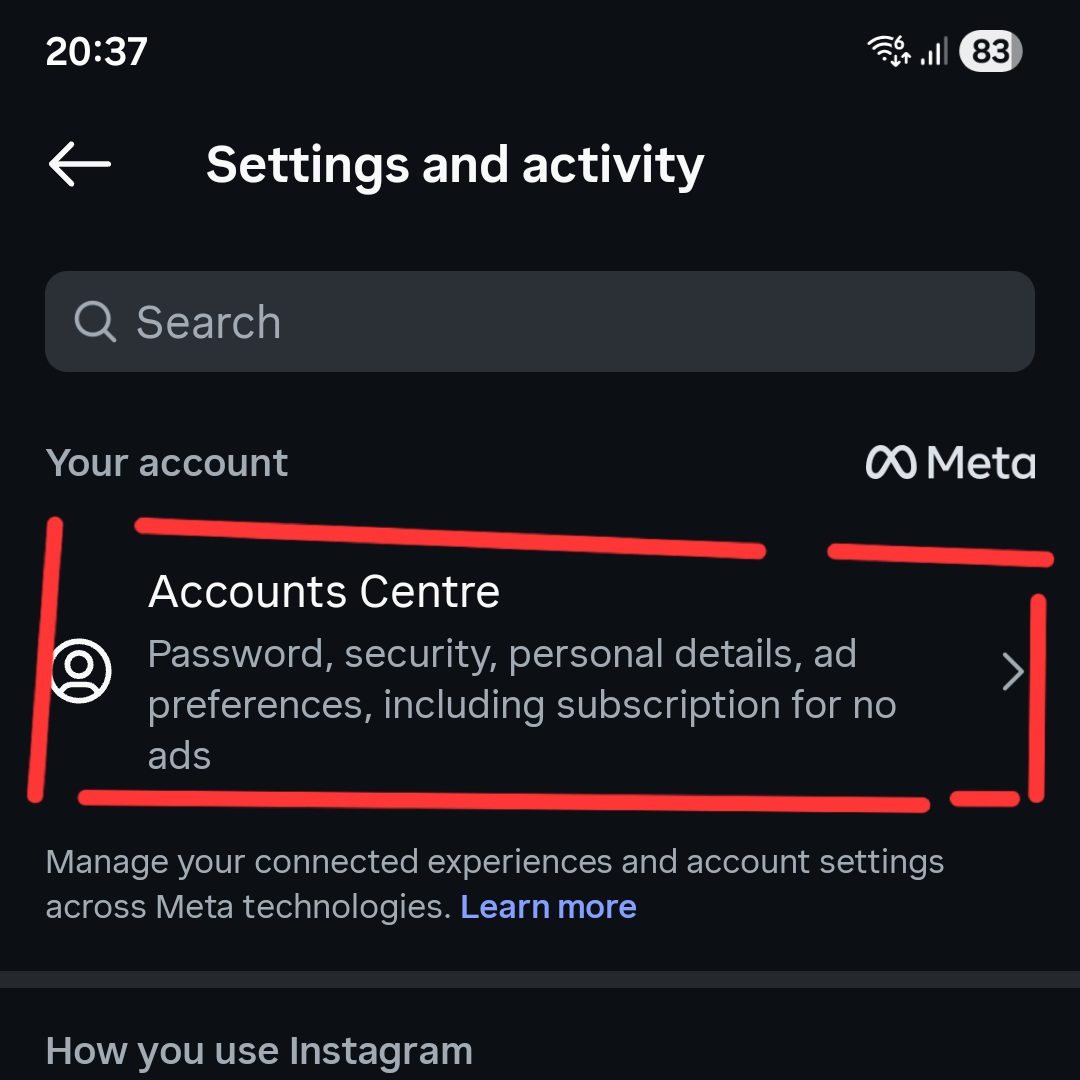
Tap on "Accounts Centre".
-
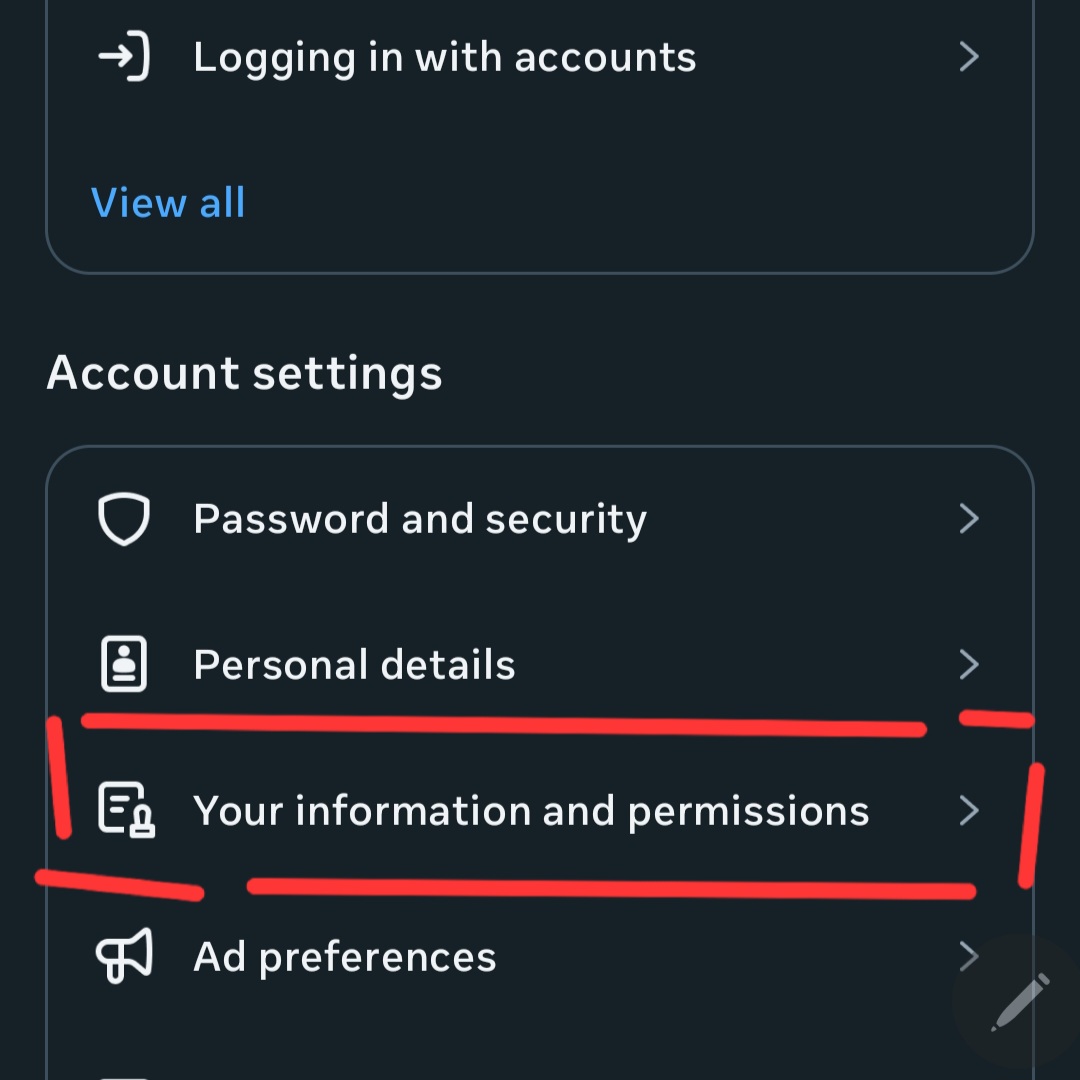
Scroll down and select "Your information and permissions".
-
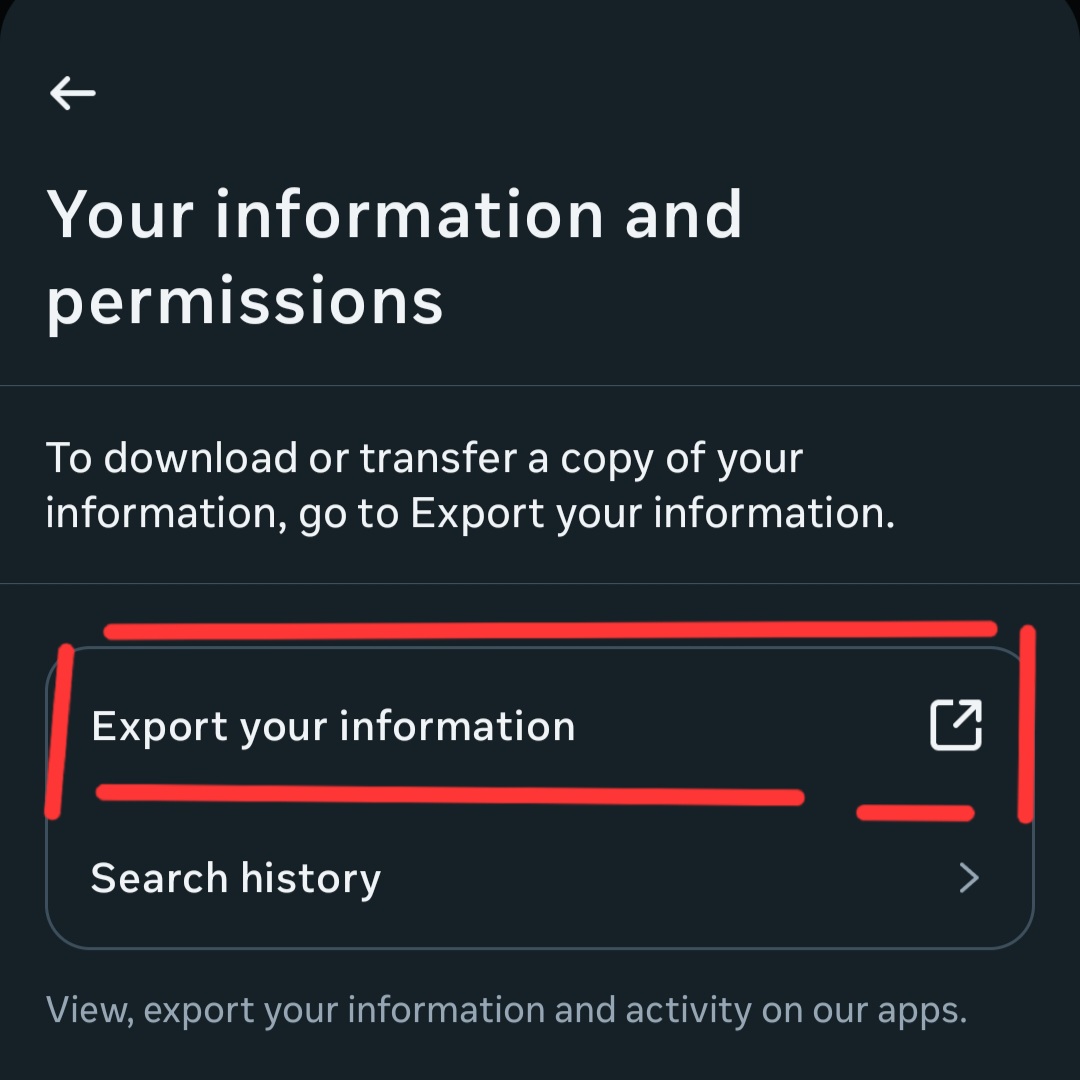
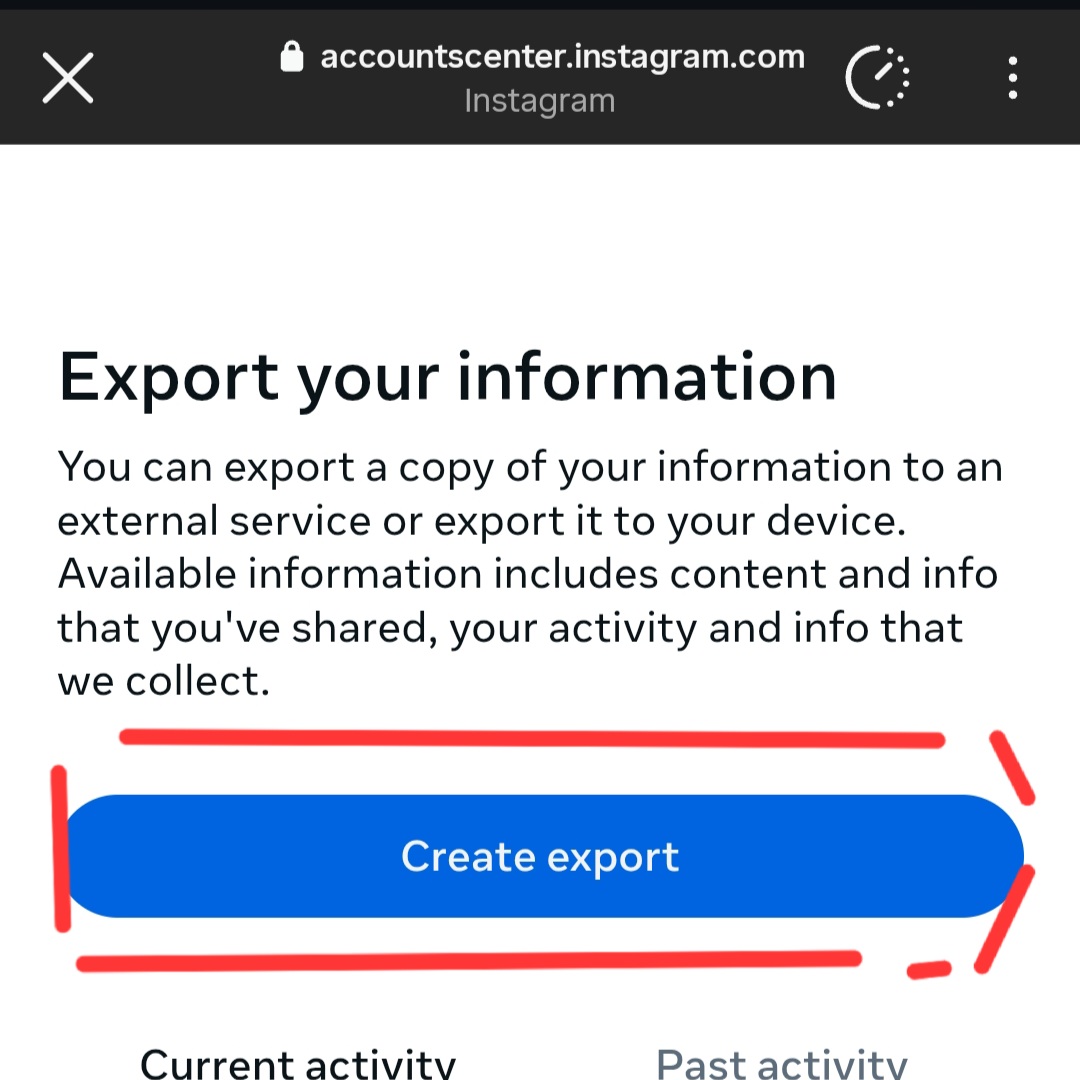
On the next screen, tap "Export your information" and then "Create export".
- Select the account you want to export data from and select "export to device".
-
Choose "Customise information". This is crucial because downloading everything can take a very long time.
-
Tap "Clear all" on all the sections and than. From the "Connections" list, check the box next to "Followers and following". This is the only data we need for this analysis.
-
Scroll to the bottom. Ensure Date range is All time and the Format is set to **"JSON"**a click "Submit request".
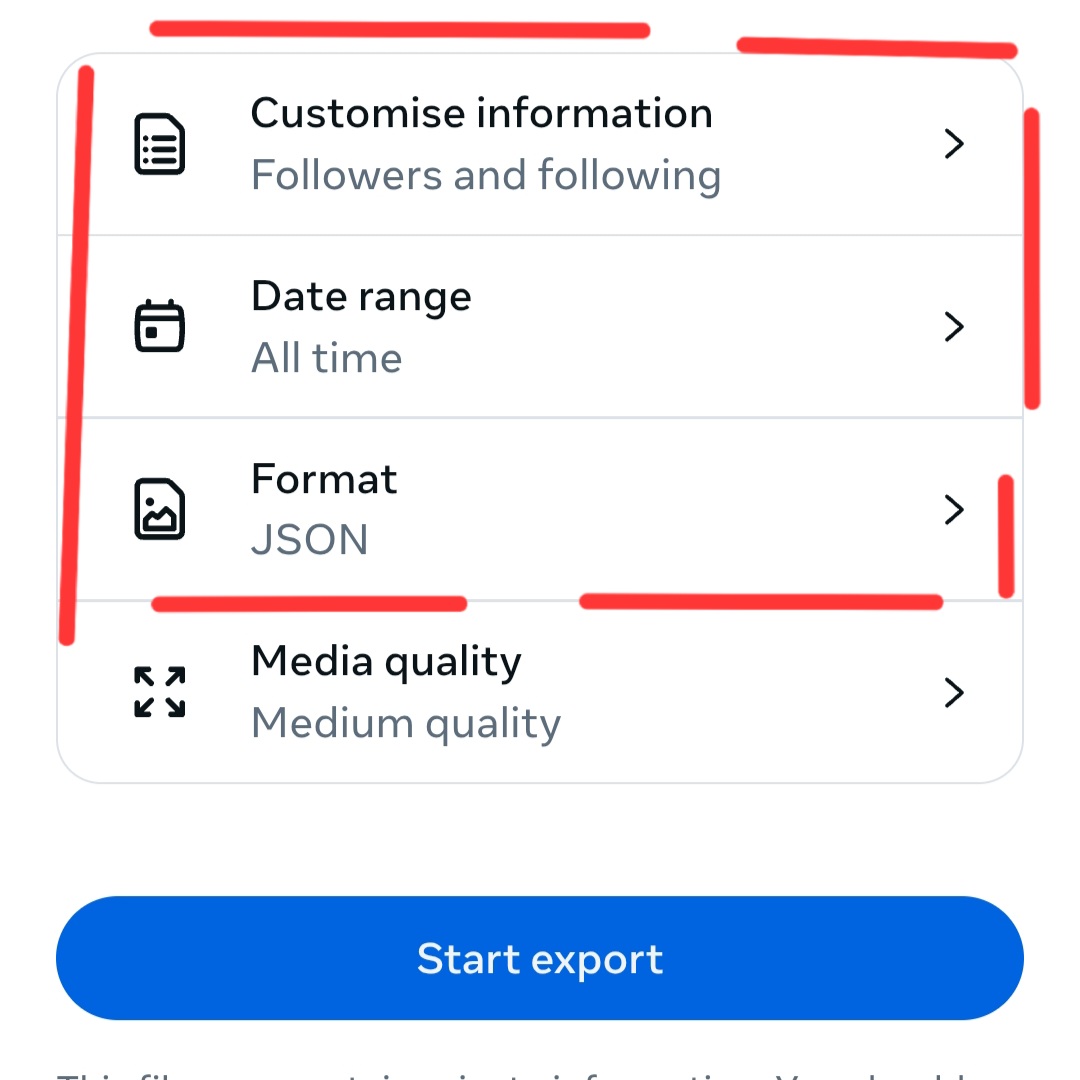
Instagram will now begin preparing your file. This can take a few hours, or sometimes longer, depending on their system load.
Step 2: Download and Unzip Your Data
You will receive an email from Instagram once your data is ready.
-
Open the email from Instagram and click the "Download information" link.
-
You will be taken to a web page where you'll need to enter your password to confirm your identity.
-
Download the
.zipfile to your computer. -
Unzip the file. You will see a folder structure. The data you need is inside the
followers_and_followingdirectory.[Placeholder for Screenshot: A view of the unzipped folder, highlighting the
followers_and_followingdirectory.]
Step 3: Understanding Your Data Files
Inside the followers_and_following folder, you will find two important files:
followers_1.jsonfollowing.json
These files contain lists of all the accounts that follow you and all the accounts you follow, respectively. If you have a very large number of followers, you might see followers_2.json, followers_3.json, and so on.
The JSON structure for each file looks something like this:
[
  {
    "title": "",
    "media_list_data": [],
    "string_list_data": [
      {
        "href": "https://www.instagram.com/username",
        "value": "username",
        "timestamp": 1678886400
      }
    ]
  }
]
The important part is the string_list_data array, which contains an entry for each user. The value field holds their username.
Step 4: Analyzing the Data to Find Unfollowers
Now for the fun part! To find out who doesn't follow you back, you need to compare the following.json list against the followers_1.json list.
The logic is simple:
If a username appears in your following list but not in your followers list, they are not following you back.
Using Unfollow.site (Recommended)
The easiest and most secure way to analyze your Instagram data is using our free tool right here on Unfollow.site. Your data never leaves your browser - everything is processed locally on your device!
Here's how:
- Keep your ZIP file - Don't unzip it! Our tool can process the entire ZIP file directly.
- Go to our Unfollowers Tracker page
- Click "Choose ZIP or JSON File" and select your downloaded Instagram data ZIP file
- Click "Upload & Analyze" - The processing happens instantly in your browser
Within seconds, you'll see a detailed breakdown showing:
- 📊 Total followers and following counts
- ❌ Who doesn't follow you back - Accounts you follow but they don't follow you
- ⚠️ Who you don't follow back - People following you that you haven't followed
- ✅ Mutual followers - Accounts where you both follow each other
You can click "Show all" on any list to see the complete details, and each username has a direct link to their Instagram profile.
Why use Unfollow.site?
- ✅ 100% Private - Your data is processed locally, nothing is uploaded to our servers
- ✅ No signup required - Just upload and analyze
- ✅ Works with ZIP files - No need to unzip or extract anything
- ✅ Instant results - See your analysis in seconds
- ✅ Mobile friendly - Works on any device
Alternative Methods
If you prefer to analyze the data yourself, you can also:
- Using a Script: Write a simple script in Python, JavaScript, or another language to load both JSON files and compare the lists
- Spreadsheet Software: Convert the JSON files to CSV format and use functions in Google Sheets or Excel to find differences
However, using our tool is much faster and easier than manual analysis!
Ready to Find Your Unfollowers?
Upload your Instagram data export and discover who's not following you back. It's free, private, and takes less than a minute!